Horns
Info
This feature is valid for Expeditions only.
Horn sounds can be customized in Expeditions starting from Season 2. Horn addons are implemented in the same way as regular addons, but with a couple of conventions.
Adding horn addons
To add a horn addon, create a separate socket inside the vehicle's XML file (truck.xml).
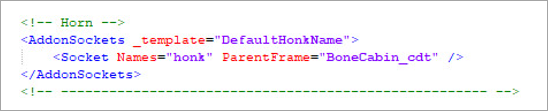
The principle of how the horn addon works is quite simple: the addon replaces the sound track specified in the Honk parameter's Sound value with the one that is defined in the addon.
The sound file format must match the project's accepted .WAV format. The sound file can be of any length.
Note
If the vehicle has the replacement.xml file (the replacement XML file), make sure to add the socket there as well.
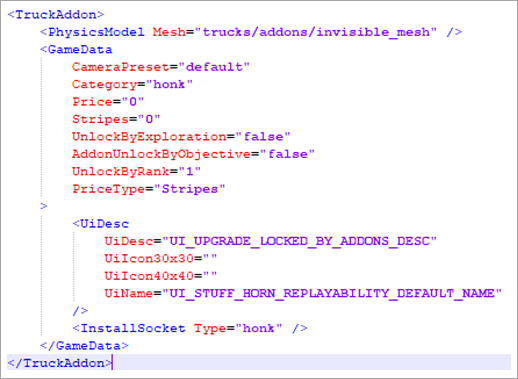
For the horn system to function properly, a universal addon named stuff_hood_honk_default.xml is used. This addon is installed in every vehicle by default (with the horn replacement functionality). It contains the base horn sound file for a vehicle.
Note that the base addon itself does not contain any references to sound files. It points to the value that is specified in the vehicle's XML file in the Honk parameter.
Addon structure
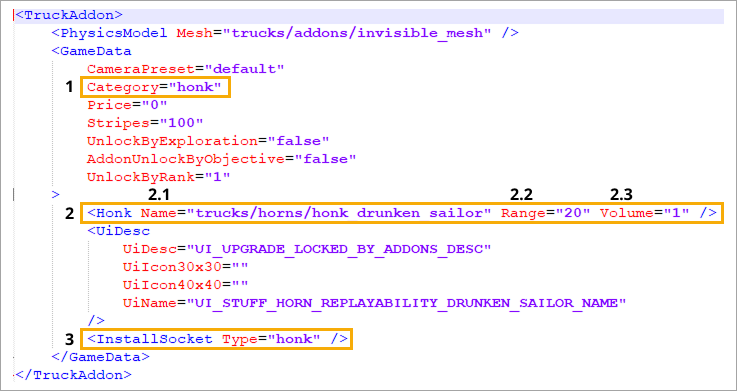
The horn addon’s functionality is similar to other addons in terms of content. The key differences include:
Category="honk"— the value that assigns the addon to the Horns section within the Decorations menu in Garage.<Honk ...>— the field for specifying the horn's sound path and parameters. It includes the following:
2.1Name="..."— the path to the sound file stored in the\MudRunner2\Media\sounds\...directory. Important: The required sound file must be stored somewhere within the\Media\soundsfolder, but it can be located in any subdirectory inside it.
2.2Range="..."— the radius of the horn sound signal (in meters from center of the vehicle's coordinates). Only applicable in cooperative mode.
2.3Volume="..."— the volume at which the horn sound is played to other players. Only applicable in cooperative mode.InstallSocket— the horn addon socket to which the addon is "attached" in the vehicle's XML file.