Calling Drones from Addons
In Season 3, the drone functionality has been expanded. Two new drones have been introduced: 4-NCR and SCT-6. All drones are now categorized into 3 distinct classes:
- CR-G0 —
CARGO_DRONE - 4-NCR —
ANCHOR_DRONE - SCT-6 —
SCOUT_DRONE
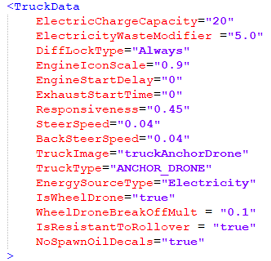
To assign a wheeled drone to a specific class, specify the corresponding TruckType parameter value in the drone's XML file (similar to truck.xml) within the
Info
In Season 3, it is impossible to create new drone classes, but you can replace drones within existing classes.
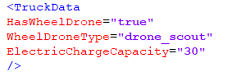
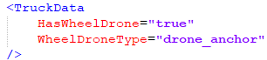
In both the frame_module_drone frame modules and drone_scout_carrier add-ons you can specify a link to the specific wheeled drone that will be contained there.
| frame_module_drone | drone_scout_carrier |
|---|---|
 |
 |
To link modules and add-ons with a specific drone:
- Set the
HasWheelDroneparameter in the<TruckData>block of the module or add-on. - Add the new
WheelDroneTypeparameter with a value matching the required wheeled drone:
| Drone | Value |
|---|---|
| CR-G0 | drone_cargo |
| 4-NCR | drone_anchor |
| SCT-6 | drone_scout |